
Reservations
The Supplier Portal contains various tabs to easily view reservations. You can also find additional information in this portal. Sending individual e-mails is no longer necessary; you can easily find everything about a booking in the portal.
You can find this information in the Supplier Portal:
A. Information about participants/members
B. Elements / information about the booked items
C. Essences and preferences/customer requests
D. Extra information about the booking
E. Information about the reference number
A. Participants/members
All the information we hold that is associated with participants is displayed within a reservation. We request as little information as possible from our clients due to privacy legislation. If you need additional information beyond the details provided, then please feel free to contact us, and we will check whether we are able to provide your requested information.
B. Elements / information about the booked items
An element is a booked item. This could represent a group tour or individual tour, a hotel, a transfer, an extra item, or an extension etc. Please note that you are only able to view those elements that are relevant to you as a supplier; for example, if we have tours where elements of different suppliers are combined, then you will only be able to see those elements that are being provided by you.
Please note that it might be possible that not all elements have been booked by all of the participants. In case of an excursion for example, perhaps only 1 out of 2 participants might have chosen to book it. Within the Supplier Portal, you will be able to view to which participants elements have been assigned. You can also view the dates that those elements were booked.
The reservation also shows the purchase price for the respective element.
C. Essences and preferences/customer requests
Essences and preferences represent certain requests from our customers. Some might be applicable for the entire party (‘connecting rooms’ for example), while others are only applicable for specific individuals (‘diabetic meals’ for example). Within the Supplier Portal, you are able to view those participants to which the requests are assigned.
A preference is a wish of the customer. The customer is aware that this is a wish and that no rights can be derived from this. If there is a preference in the reservation, ANWB Reizen does not need feedback for this. Please note that some requests can be essential for a client, such as medical essences. If you are not able to comply with such an essence, then a client should be able to cancel the booking without incurring any costs. A medical essence will also always be on request, so the reservation is not final until this essence is confirmed.
D. Extra information
The extra information can contain necessary details that are relevant to the reservation. In case of a ferry crossing for example, the extra information can contain the dimensions of the vehicle. Or in the case of a skiing holiday for instance, the extra information can contain the shoe sizes of the participants, enabling the correct size of ski equipment to be booked. We can add specific questions to our website linked to specific tours, depending on the information needed by you as a supplier in order to complete a booking. Please contact us if certain information that is necessary for you is omitted.
E. Reference number
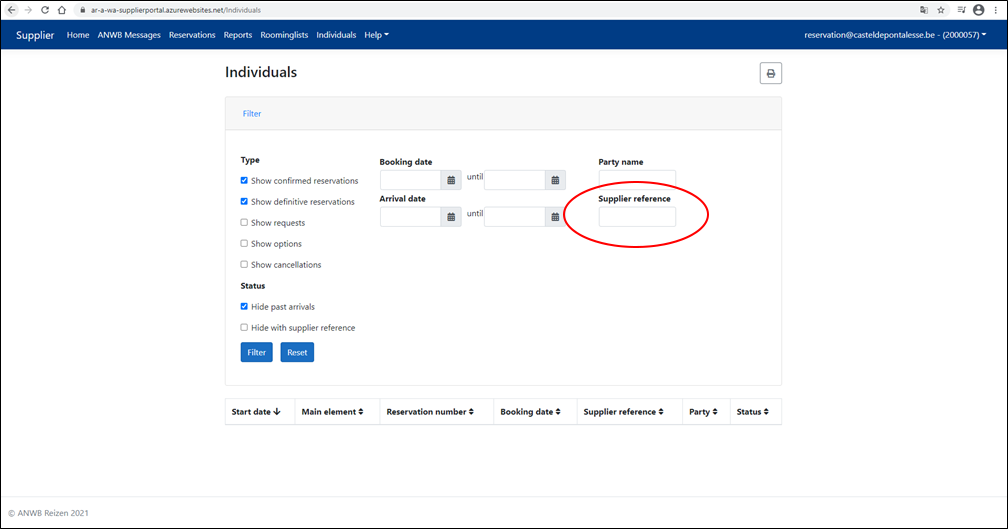
All bookings have an individual reservation number, which is automatically created by our system. In addition, you are also able to add your own reference number to a booking. Via the ‘Individuals’ page, you are able to search by using this ‘supplier reference’, which might come in handy when you use a different method for organizing your bookings within the system used at your own business.
New since November 2021:
Excel export now with extended reservation data
It is now possible to download an extensive export of selected reservations. As a supplier, you can use the Individuals page to search for a list of reservations based on filters. Through the 'export to excel'-button an excel list is made with per reservation extended reservation data:
- Participants
- Elements and service types (room type, service) + period
This way, as a supplier, you can easily check whether everything has been properly registered in your own systems.
Changes are marked and there is a new button to confirm changes.
When a reservation is changed by ANWB, the change will now be shown in the reservation overview by marking the field.
If previous information has been changed, the background will turn orange. If previous information is cancelled (deleted), the background will become red. If new information has been added, the background will turn green. See below :
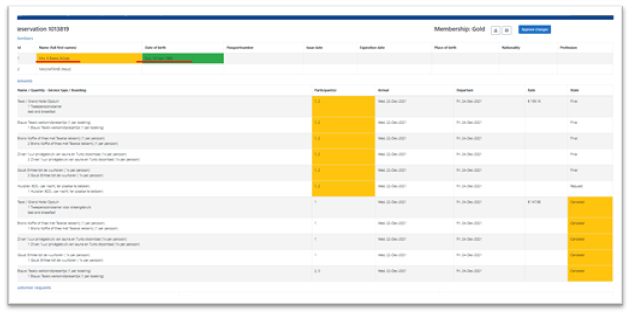
On top of the right side of the booking overview a new button has been added [Approve changes].

When a change is confirmed, a confirmation will automatically be sent to ANWB with the following message:
Confirmed the changes on reservation
The version is important for the ANWB operations department to know which version of the booking has been confirmed / seen.